


Magic: The Gathering Companion
4.6843.00 Reviews
App Specs
- Version
- 1.11.45
- Updated On
- License
- Free
- Downloads
- 1,000,000+
- Developer
- Wizards of the Coast LLC
- Categories
- Events
- Platform
- Android, iOS
Screenshots



 Analysis by AppCompare
I find the clearest reason to try Magic: The Gathering Companion is its connection to the practical side of playing Magic: The Gathering: keeping a match organized and making event participation less dependent on paper notes. It is a free events app from Wizards of the Coast LLC, and its focus is narrower than a general card database or deck-building community. That focus is useful when I am heading to a game and want one familiar place for match-related tasks, but it also means it is not a substitute for every tool a player might use around the game.
Reading the screen and finding the right task
For a player who already knows the basic flow of a match or tournament, the app’s appeal is that it brings several related jobs together instead of making me switch between a life-counter app, handwritten notes, and separate event information. Its interface is described as smooth and intuitive, and that matters in a setting where I may only glance at the phone between turns. I would still take a moment to explore the controls before an event rather than learn them while other players are waiting.
The app is aimed at Magic events, not at teaching every rule or explaining card interactions. A new player can use it for basic match organization, but should not expect it to replace a rules reference, a judge, or a patient friend. I would treat it as a companion to the table: helpful for keeping track of selected details, while the cards, players, and event staff remain central to the game.
Different players, different ways to use it
Digital tracking can reduce the need to handle dice or keep updating a handwritten total, which may be useful for players who find those small repeated actions awkward. It can also be convenient for someone who prefers seeing a running total on a phone. That said, a phone screen is not automatically easier for everyone. Glare, small text, touch accuracy, and the need to unlock or operate a device can all affect the experience, especially at a busy table.
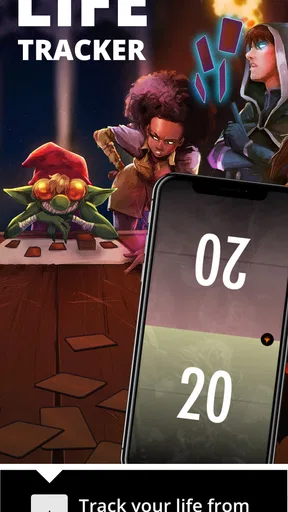
I would test the life-counter workflow at home before relying on it in a close match. Agree with your opponent on how you will record changes, and check that both players can see or verify the total when needed. That simple habit keeps a convenient digital tool from becoming a source of confusion. If using a phone interrupts your concentration, or if your group prefers visible dice, paper may be the better choice for tracking life.
When it helps—and when it doesn’t
Companion is most compelling for players who attend organized events and want event-related tools alongside match tracking. It is less compelling if you mainly want a detailed card search, a collection manager, or a social space for discussing decks; those are different jobs, and dedicated alternatives may suit them better. The app’s event focus is a strength when you need it and a limitation when you do not.
It has an average rating of around 4.2 from roughly 13,000 ratings, and more than a million installs. It is rated for Everyone, first released in July 2020, and version 1.10.6 supports Android 8.1 or later. Those figures give a quick sense of its established audience and compatibility, but the practical question is still whether your local events use its event workflow and whether you like using a phone at the table.
Worth Reading Before You Choose

Baby Panda World Brings Quick Play to Modern Phones, but Its Game Library Feels Busy

ESPN’s Live Game View Makes Following Close Games Easier

QuizzLand Review: A Good Fit for Short Trivia Breaks, Not Every Player

Basketball Stars: Multiplayer Is Fast, but Can It Recover When Matches Go Wrong?

WEBTOON Turns Phone Updates Into a Better Reading Routine

Link to Windows Runs on Shared Habits, Not Social Feeds
Getting Started with the Companion App
Jumping into the app is a breeze. Whether you’re on Android or iOS, you can easily find and download it from your app store. Once installed, the interface is smooth and intuitive, which is a relief when you’re eager to get into the game. The app is designed to be your digital sidekick, keeping track of life totals, managing tournaments, and supporting events.
Features You’ll Love
So, what makes this app stand out in the magical realm of card games? First off, the Magic: The Gathering Companion offers a versatile life counter, which is super handy. No more scrambling for dice or pen and paper! You can track your life totals seamlessly, leaving you free to focus on strategy.
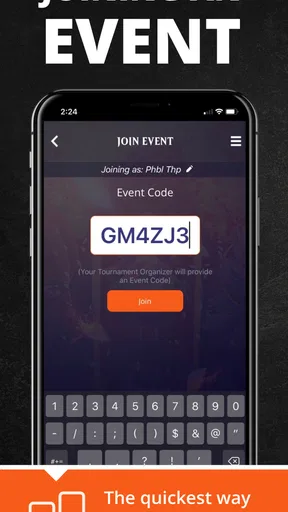
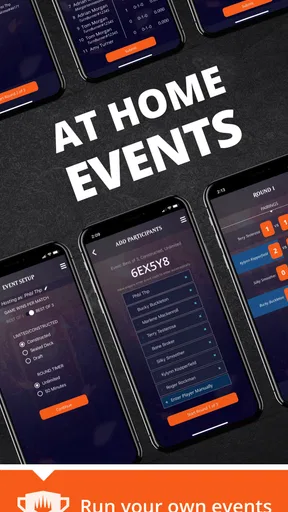
The app also shines with its event management features. You can find, join, and even create tournaments with ease. The built-in pairings and standings updates are a godsend for players who love competing in local events or even larger tournaments. It’s like having a tournament organizer in your pocket.
Deck Management and More
One of my favorite features is the deck management tool. You can build and organize your decks right in the app. It supports a range of formats, making it a versatile tool for all kinds of players. And if you’re forgetful like I am, having your deck list on your phone is a lifesaver.
The app also keeps you updated with the latest Magic news and events, ensuring you never miss out on new releases or tournaments. Plus, the sleek design makes navigating through features a breeze, which I appreciate when I’m in the heat of a battle.
Planning for a smoother event day
One useful way to approach the app is to separate preparation from play. Before leaving home, I would check the event details and make sure I know how to reach the relevant tournament screen. At the venue, I would confirm I have joined the correct event rather than assume that merely opening the app puts me into the right pairing flow. This small check helps avoid the most frustrating kind of phone-based delay: discovering a setup step while the round is already underway.
For a local organizer, the ability to create an event can make Companion worth trying even if most attendees still use paper for personal notes. It gives the organizer a digital route for event administration, while players can decide how much of the app they want to use at the table. I would not make a group’s entire routine depend on one person’s familiarity with the interface, though. A quick explanation before the first round is more inclusive than assuming everyone has used it before.
In a realistic evening scenario, I might check the event before heading across town, arrive and confirm I am in the right place in the app, then use the match tools once play begins. If a pairing or result needs attention, I can focus on the event workflow instead of searching through unrelated deck or news features. The benefit is not that a phone makes Magic simpler; it is that the administrative steps can feel less scattered when the event uses the app.
How it compares with paper and other tools
Against pen and paper, Companion offers a more connected event experience: tournament activity and match tracking sit within a Magic-specific app rather than in separate notes. Paper still has real advantages. It needs no battery, is easy to leave in view, and can be more comfortable for players who dislike handling a phone during a game. Dice are similarly immediate for life totals and make changes visible to both players. I would choose the digital option when event coordination matters, and keep paper or dice when simplicity and shared visibility matter more.
Compared with general life-counter apps, Companion makes more sense for someone who wants the broader event context, not merely a number that changes during a match. Compared with card databases or deck-focused tools, its main value is different: it supports playing and attending events rather than serving as an encyclopedic reference. That distinction helps set expectations. If your first question is “What does this card do?” another kind of app is likely a better fit; if it is “How do I keep this event and match organized?” Companion is closer to the job.
Small habits that prevent avoidable friction
I would keep the phone’s role clear before a match: decide whether it is being used for life totals, event participation, or both, then avoid switching tasks unnecessarily during play. If the device is shared or another player needs to verify a total, pause and show the relevant screen rather than reading out a number while attention is elsewhere. For a deck list, having it on the phone can be a handy backup, but I would not assume that looking up cards or organizing a list is the same as having a printed list ready when an event requires one.
It is also worth thinking about the room, not just the interface. A dim screen may be hard to read under bright venue lighting, while spoken notifications or frequent checking can distract nearby players. I would silence unnecessary interruptions and position the phone so that it is easy to consult without taking over the play area. These are ordinary adjustments, but they can make a shared table more comfortable for people with different preferences and sensory needs.
Questions I would settle before relying on it
Is it useful if I do not play tournaments? It can still help with life tracking and keeping a deck list close at hand, but its strongest reason to install it is the event side. If you only play casual kitchen-table games and already like dice, you may not gain enough to change your routine.
Does it replace a rules resource or a full deck database? I would not treat it as either. Its match and event tools address organization, while rules questions and detailed card research are better handled with resources designed specifically for those tasks. Can every event be managed through it? I would check how the organizer is running that particular event instead of assuming every venue uses the same workflow; the app is useful when it fits the event’s process.
Is a phone always the fairest way to track life? Not necessarily. For a close game, both players should be able to verify the total, and some groups will find dice or written tracking clearer. I see the app as an option rather than a universal replacement. That flexibility is especially important for players who have different comfort levels with screens, touch controls, or quick visual changes.
Final Thoughts
In a nutshell, the Magic: The Gathering Companion app is a must-have for any serious player. It brings a level of organization and ease that complements the game beautifully. Whether you’re a seasoned planeswalker or a newcomer to the multiverse, this app is a game-changer. So, go ahead, download it, and let it enhance your Magic journey!
My more measured recommendation is to try it if you regularly attend organized Magic events, help run them, or want digital match tracking in the same place as event tools. Wizards of the Coast LLC offers it free, which makes experimenting low-risk, though the value still depends on whether its workflow suits your group. The app is not a universal accessibility solution: phone use can ease some tasks and create others, depending on vision, dexterity, attention, lighting, and personal preference. I would install it, explore before game night, and then decide with my play group whether it makes the table clearer and calmer. If it does, keep it in the routine; if not, paper, dice, or a specialized tool may be the more considerate choice.
Pros
- User-friendly interface for easy navigation.
- Real-time updates during matches.
- Supports multiple game modes.
- Quick access to tournament details.
- Helps track life totals efficiently.
Cons
- Requires constant internet connection.
- Limited features without account.
- Occasional app crashes reported.
- No offline mode available.
- Lacks deck-building tools.
FAQs for Magic: The Gathering Companion
What is Magic: The Gathering Companion and what does it offer?
Magic: The Gathering Companion is an official app designed to enhance the tabletop gameplay experience of the popular card game Magic: The Gathering. It offers features such as event management, life tracking, and access to the latest news. The app also allows players to connect with others, participate in events, and keep up with new set releases.
Is Magic: The Gathering Companion free to use?
Yes, the Magic: The Gathering Companion app is free to download and use. However, while the app itself does not require any in-app purchases, playing Magic: The Gathering physically does involve purchasing card sets and decks. The app primarily serves as a digital tool to assist with gameplay and event management.
What devices are compatible with Magic: The Gathering Companion?
The app is available for both Android and iOS devices. It requires Android 6.0 or later, and iOS 11.0 or later. Users should ensure their device’s operating system is up to date to avoid compatibility issues. It's recommended to check the specific device requirements on the respective app store before downloading.
How does Magic: The Gathering Companion enhance gameplay?
Magic: The Gathering Companion provides tools for organizing and managing events, including tournaments. It offers a life counter, rule lookup, and pairing system for matches, which streamlines the setup and management of games. These features help players focus more on strategy and gameplay rather than logistics.
Can I use Magic: The Gathering Companion offline?
While the app offers some offline functionalities like life tracking, most features require an internet connection. This is especially true for event management, updates, and accessing the latest news and releases. To fully utilize the app, a stable internet connection is recommended.


